Customising Your Dashboard
The Dashboard can be customised to display the information that is most relevant to your role and daily activities.
Accessing Dashboard Settings
Open the User Menu by clicking your Avatar (Top Right).
Select the “My Settings“ Option
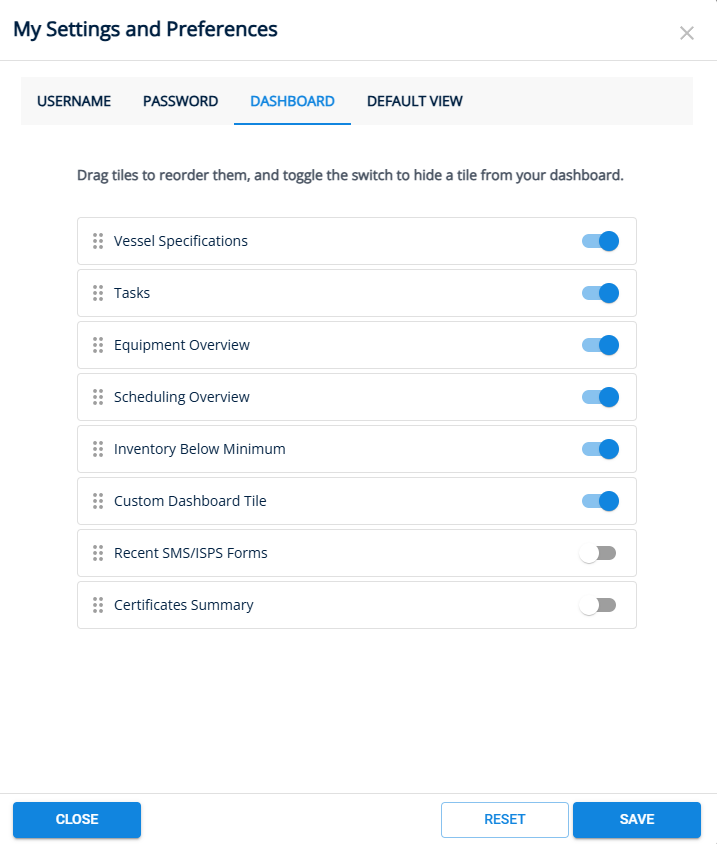
Navigate to the Dashboard tab.
Showing and Hiding Dashboard Tiles
Each Dashboard Tile can be shown or hidden using the toggle switch beside its name.
To show a Tile, enable the toggle.
To hide a Tile, disable the toggle.
Click Save.
Reordering Dashboard Tiles
Dashboard Tiles can be arranged in any order to suit your preferences.
Drag and Drop the desired Tile to its new position.
Repeat as needed.
Click Save.
Last updated 2026-06-01