Tasks - Certificate Tasks
When a Task relating to an expired/expiring certificate is completed, YMS allows you to update the related Certificate as part of the Task completion workflow.
You can:
Replace the Certificate when a new Certificate has been issued.
Renew the Certificate when the existing Certificate’s expiration date has been extended.
Archive the Certificate when it is no longer required.
 Task Completion Workflow
To complete an expired Certificate Task:
Open the required Task.
Click the Complete Task button.
Select the appropriate Certificate action from the dialog.
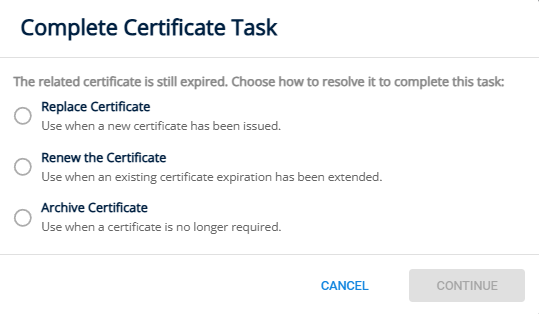
 Replacing a Certificate
Use this option when a new Certificate has been issued to replace the expired Certificate.
Selecting Replace Certificate archives the existing Certificate and allows you to create a new Certificate using details copied from the existing Certificate.
To replace a Certificate:
Select Replace Certificate from the dialog.
The existing Certificate will be archived.
The Create New Certificate dialog will open.
Review the Certificate information copied from the previous Certificate.
Enter the Certificate number, issue date, expiration date, and any other information from the new Certificate.
Click Create.
Optionally upload a scan or attachment of the new Certificate.
Close the dialog.
Once the replacement Certificate has been created, the Task is completed and removed from the work list.
 Renewing a Certificate
Use this option when the validity of the existing Certificate has been extended.
Renew the Certificate when the existing Certificate remains valid but its expiration date has been extended.
To renew a Certificate:
Select Renew the Certificate from the completion dialog.
The related Certificate will open.
Update the Expiration Date.
Review and update any other Certificate information where required.
Optionally upload a new scan or attachment of the renewed Certificate.
Save and close the Certificate Dialog.
Once the Certificate has been updated, the Task is completed automatically and removed from the work list.
 Archiving a Certificate
Use this option when the Certificate is no longer required.
Select Archive Certificate when the Certificate is no longer required and should not be replaced or renewed.
To archive a Certificate:
Select Archive Certificate from the completion dialog.
Confirm that the Certificate should be archived.
The related Certificate is archived, the Task is completed automatically, and removed from the worklist.